AI Developer Tooling
ProdEngine
Designed & built full-stack by Farivar Zarvandeh
Governed task loop that keeps AI coding agents accountable.
Todo
PCODE-42 · Sprint 13
Fingerprint CodeLens
In Progress
Review
- VS Code commands
- 33
- Webview panels
- 9
- Claude Code hook events
- 6
- Unit test files
- 61
- End-to-end tests
- 16
- Planned sprints delivered
- 14
Figures counted from the repository; maturity note: Version 0.1.0 with all planned sprints delivered and an extensive automated test suite. The extension installs from a packaged .vsix; Marketplace publication, a manual clean-profile smoke run, macOS end-to-end testing and team features are still open.
01
Product introduction
ProdEngine wraps Claude Code in an enforced project-management loop: no code without a task, ticket states that follow the work, and every code block fingerprinted with its task, sprint and version. A Python engine with agent hooks plus the PlaneCode VS Code extension take a project from written idea to planned sprints, traceable code, releases and deployment.
02
The problem
AI coding agents are fast but undisciplined: they write code that is not linked to any ticket, sprint or release, lose their context when a session resets, and never update the tracker. Planning a project into concrete, testable work is manual, and release chores such as versioning, changelogs, Docker packaging, deployment and security checks are scattered across separate tools. Rate limits and flaky networks quietly drop tracker updates.
03
The solution
ProdEngine makes the tracker the single source of truth and enforces it at the agent level. Claude Code hooks deny code edits without an active task, inject the active task into every prompt, recover it after resets, and post commits, test results and progress back to the board through a throttled, offline-safe queue. An AI planning run turns a written description into architecture, rules and one-day sprints with acceptance criteria. A task cannot be closed until its fingerprint appears in the code, and the PlaneCode VS Code extension surfaces the whole loop (board, task panels, fingerprint CodeLens, generated docs, version bump, Docker, deploy and security checks) without ever writing to the tracker itself.
04
Core features
Agent guardrails via Claude Code hooks
ImplementedHooks on six session events refuse edits to code files without an active task, inject task context into each prompt and restore the active task after resets or compaction.
Task loop CLI
Implementedsync, list, start, status, note, done and version bump commands move tickets through Backlog, Todo, In Progress, Test, Review and Done as the work happens.
Code fingerprints
ImplementedEvery file and block carries a [TASK | SPRINT | vVERSION] marker in the language's comment syntax; closing a task is refused if its marker is missing, and an index maps tasks to files and lines.
AI planning run
ImplementedClaude Code reads a project description and writes architecture, design system, criticals, coding rules and a validated sprint plan, which is published to the tracker only after an explicit check and confirmation.
Automatic progress reporting
ImplementedCommits, green test runs and session pauses are posted to the ticket automatically; green tests move the task to Test.
PlaneCode VS Code extension
ImplementedSprints board, task detail and new-task panels, status bar, setup and plan wizards, with an offline board when the tracker is unreachable.
Fingerprint CodeLens and generated docs
ImplementedA lens above each fingerprint shows the task title and state, and code documentation per sprint and task is generated from the fingerprint index.
Release, Docker and deploy panels
ImplementedGuarded version bumps with changelogs built from finished tasks, agent-generated Docker files under a tracked task, health checks, and deploys via Coolify or SSH with every attempt logged.
Security checklist and audits
ImplementedAn in-repo security checklist with npm audit, pip-audit and a secret scan that report findings but never tick items automatically.
Multi-project dashboard
ImplementedCounts by state, today's sprint and last activity for every project in the workspace, cached and rate-limited.
Orqiva web command center
PartialThe same governed loop as a self-hosted web app: projects, AI-led ideation, agents with budgets and accountable owners, test runs with evidence, risk-ranked security findings and release trains.
Marketplace release and one-click installer
PlannedPublishing the extension to the VS Code Marketplace and a single Windows setup that installs engine, hooks and extension.
Team awareness and webhooks
PlannedShowing who holds which task across machines, and replacing polling with tracker webhooks.
05
System architecture
Two halves with a strict single-writer rule. The Python engine (standard library only) owns every write to Plane, git commits, task state moves and fingerprint checks, sending updates through a throttled, persistent queue. Claude Code hooks call into the engine on every session event to enforce the loop. The PlaneCode VS Code extension is the user interface: it spawns the engine for every action, reads Plane through a GET-only, rate-limited client, watches the project's .plane/ state files, and drives Docker, Coolify and SSH for releases. There is no database; state lives in Plane and in versioned files in the repository.
Hover or focus a component to trace its real connections.
10 components · 11 connections, as found in the repository.
06
Technology stack
- frontend
- TypeScript (strict)VS Code Extension APIWebviews (plain HTML/CSS, CSP nonce)esbuildCodicons
- backend
- Python 3 (standard library)PowerShell / WinForms setup UI
- data
- Plane REST API v1JSON / JSONL / Markdown state filesVS Code SecretStorageWindows DPAPI
- ai
- Claude Code CLIClaude Code hooksPlane MCP server
- infra
- GitHub Actions (Windows, Ubuntu, macOS)Docker & Docker Composevitest@vscode/test-electronpytestESLintPrettiervsce
- integrations
- PlaneClaude CodeGitDockerCoolifySSHnpm auditpip-audit
07
Product experience
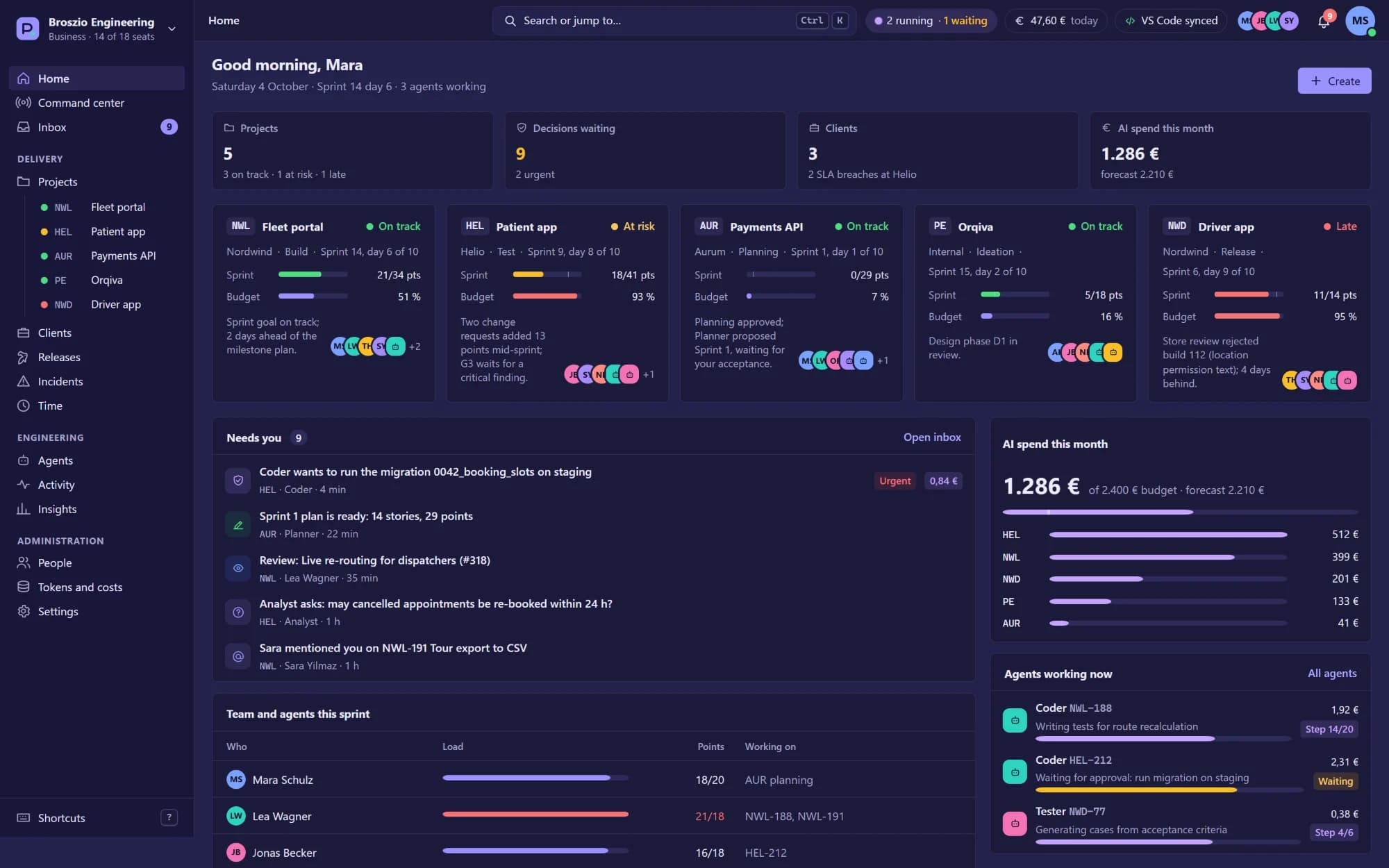
ProdEngine has since grown into Orqiva, a self-hosted web command center (v0.1.0) where people and AI agents carry a product from idea to release under the same rules. These are real Orqiva screens, shown with demo data.
Plan a project
- 1Write a project description
- 2Draft plan: Claude Code writes architecture, rules and a sprint plan
- 3Review and validate the plan
- 4Publish sprints and work items to Plane after confirmation
Daily development loop
- 1Sync carries over unfinished items and flushes pending updates
- 2Start a task: it moves to In Progress and its fingerprint is announced
- 3Claude Code writes fingerprinted code; edits without a task are refused
- 4Green tests move the task to Test automatically
- 5Done checks fingerprints, commits and moves the task to Review
Release and deploy
- 1Bump the version on a clean worktree
- 2Generate the changelog from tasks finished since the last tag
- 3Build and health-check the Docker image
- 4Deploy to a chosen Coolify or SSH target; the attempt is logged to the Release item
07b
AI capabilities
Description-to-sprints planning
Launches Claude Code with a dedicated planning prompt that writes architecture, design system, criticals, coding rules and a JSON plan of one-day sprints, each item with a description and at least two acceptance checks.
Runtime guardrails for an autonomous agent
Hooks deny code edits without an active task or after the task left In Progress, and remind the agent of the exact fingerprint header to add.
Context persistence across resets
A session brief with rules, criticals, today's sprint and the recovered active task is injected at session start, and a one-line task status precedes every prompt.
Agent-generated infrastructure under governance
Dockerfile and compose generation is created as a tracked task and executed by Claude Code, so even infrastructure files are fingerprinted and traceable.
08
Engineering challenges
- 01
Single writer across two runtimes
The extension's Plane client exposes GET methods only, enforced by a unit test and an ESLint restriction, so all writes flow through the Python engine and its ordered queue without race conditions.
- 02
Rate limits shared by engine, hooks and UI
A 60 requests/min API budget is split between a 55/min engine throttle and a 20/min token bucket in the extension, with polling floors and exponential back-off on 429 responses.
- 03
Identical parsing in Python and TypeScript
The fingerprint regex, skip lists and comment rules are mirrored byte-for-byte between fingerprint.py and the extension and verified against shared test cases.
- 04
Robust process spawning
Engine calls pass argv arrays with correct cwd and environment, normalise CRLF and UTF-8, and are tested from paths containing spaces and non-ASCII characters.
- 05
Secrets never leak
Keys live only in SecretStorage or a DPAPI store, and a redaction layer masks API keys, bearer tokens and stored values in every log line, notification and comment.
09
Technical differentiators
Enforcement, not convention
The loop is a hard gate inside the agent's tool calls, not a guideline the agent may ignore.
Code-level traceability
Fingerprints tie every block of code to the task, sprint and version that produced it, and drive CodeLens, docs and the done-check.
Built with itself
The extension was developed through its own loop across 14 one-day sprints, and its source carries the fingerprints to prove it.
Every critical has a guard test
Twelve documented must-never-break rules each name the test that guards them, and an architecture test fails the build if a documented module disappears.
10
Explore further
The source repository is private. A live walkthrough is available on request.